Retro writing 15 – Pomera DM250

…and my current writing setup

Just recently, our small son began his kindergarten experience, getting used to it at first, just for two or three hours each morning. This schedule allowed me to go every weekday morning to a cafe nearby and try to focus on writing.

Accidentally, this forced schedule also came at a great time because I not only have two book projects requiring quite a lot of writing work but also managed to set up my writing environment and tools to my satisfaction. And so, using my son’s kindergarten time for cafe writing, I was able to create and edit more than twenty thousand words in the first two weeks in a very comfortable way.

The Pomera DM250

The main part of my new writing system revolves around the Pomera distraction-free writing device.

I have been using a Pomera (an older DM30 model) for a few years now, like it a lot, and reviewed it HERE, so I was ecstatic to see that the updated, all-new DM250 finally restored the option to change the interface language to English which was sadly missing from the DM200 for some reason. I bought the new model straight away for all the writing I had planned and got to work setting it up!
Hardware

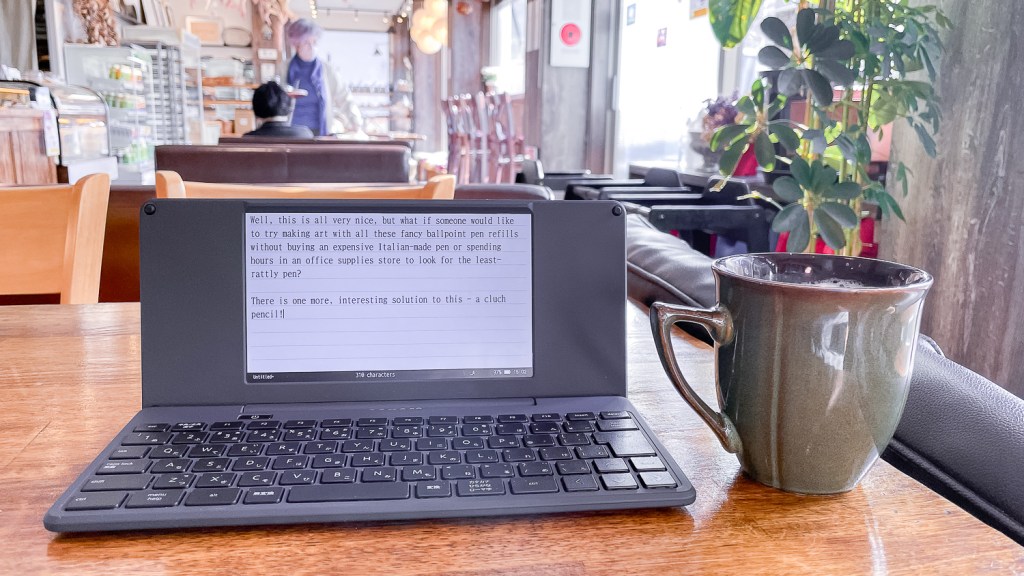
The Pomera devices are dedicated, distraction-free electronic writing and memo-taking solutions. In Japan, these are advertised to writers, journalists, translators, and also to anyone who writes a lot in meetings. Here, in-person business meetings are still very popular, and many office workers can be seen lugging around company-issued Panasonic notebooks and such all the time. A whole market of more enjoyable solutions exists for them – electronic notebooks, hybrid pens that connect to smartphones via Bluetooth, e-ink tablets, and the Pomera series devices are all parts of it. The Pomera is made by a company that mainly produces office supplies called Kingjim (with “jim” meaning office – Kingjim is Office King) with already ten years of development invested in this products line!

The DM100 and 200 series devices look like very slimmed-down laptops with no touchpad and a small screen. I like this form factor as it enables me to use the DM250 anywhere I want, even if I have no table handy. Typing on a train is easily done!

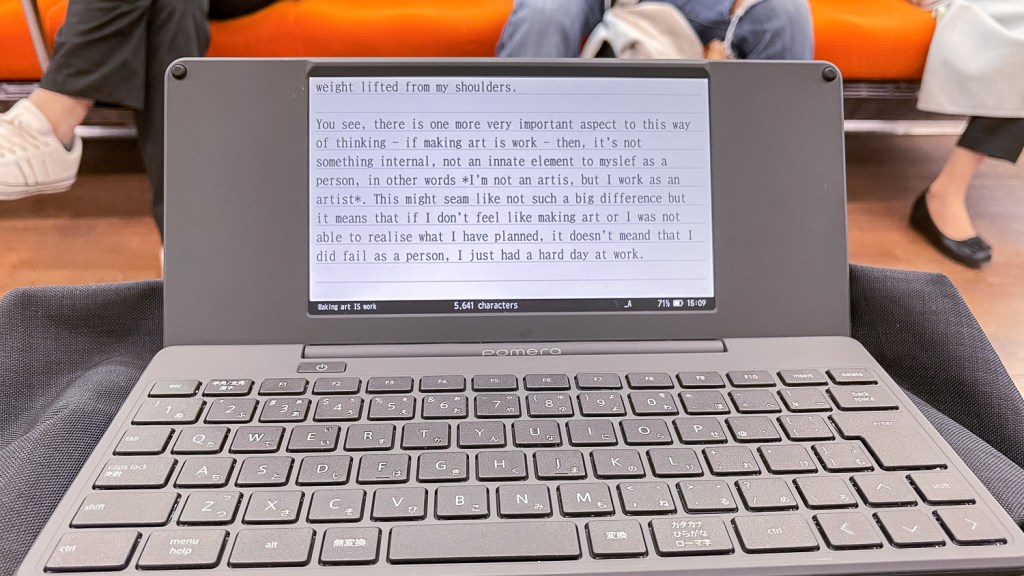
The device is light (only 620g), built of sturdy-feeling plastic, and very compact when folded. The updated DM250 really feels like a device with a long lineage with solved problems and smoothed corners that I can use every day for proper work without worrying about it too much – it’s not some DIY project or first-generation Kickstarter thing!

The screen is a backlit 7 inches TFT panel with 1024×600 pixel resolution (WSVGA) and is very readable even though it is just a usual color LCD screen used for displaying black and white text.

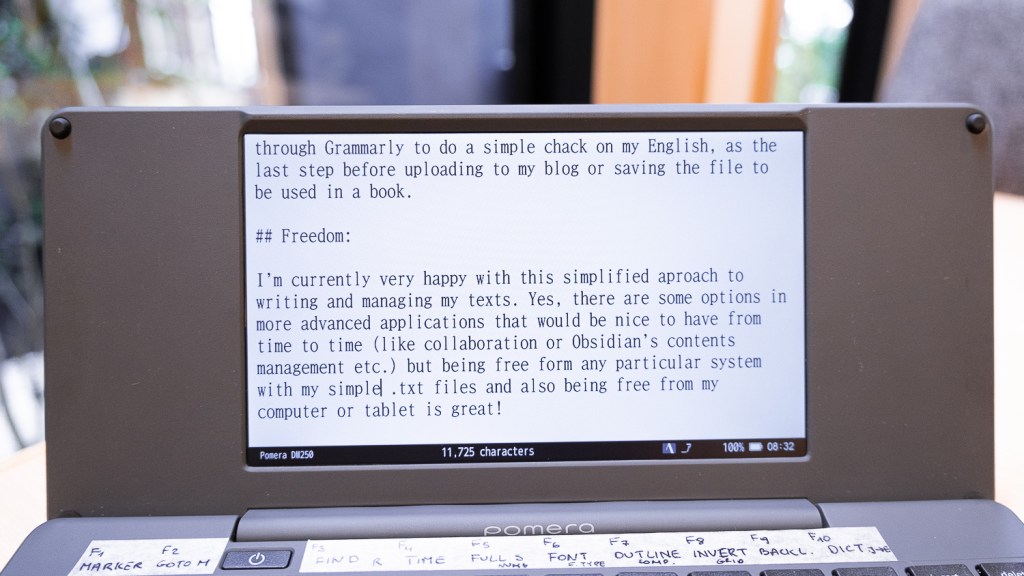
If possible, I would prefer something like a memory LCD (like the one in Panic’s game console) with an optional backlight for longer battery life and visibility in direct sunlight, but what’s here is not bad.
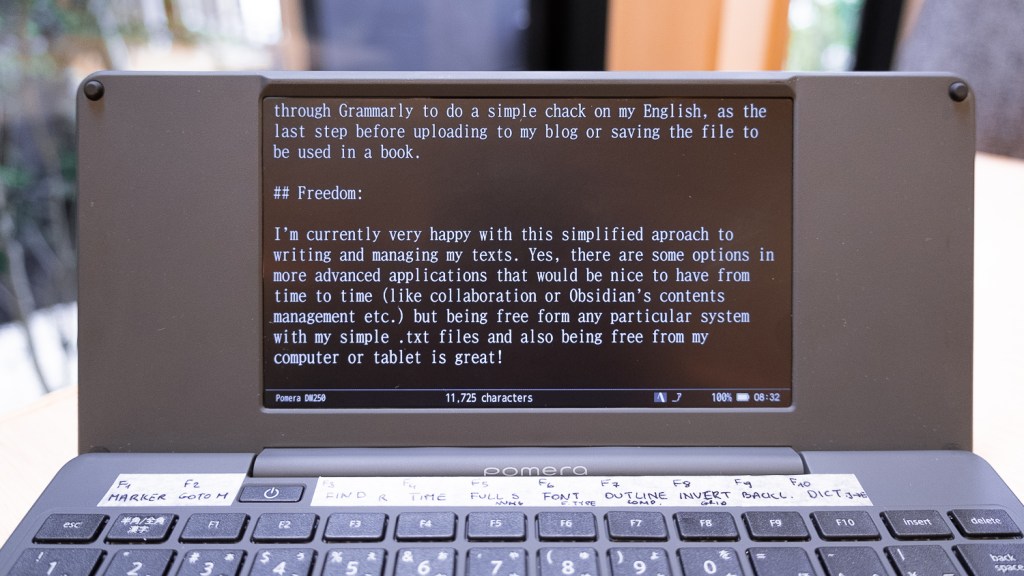
The hinge is sturdy, with just the right amount of friction, allowing for good adjustment of the screen angle. The keyboard, even though on the smaller side, has a good, tactile feel to it and enough space between the keys to make typing quite comfortable. We also get (as with the other Pomera’s) a row of F-keys that can be customized.
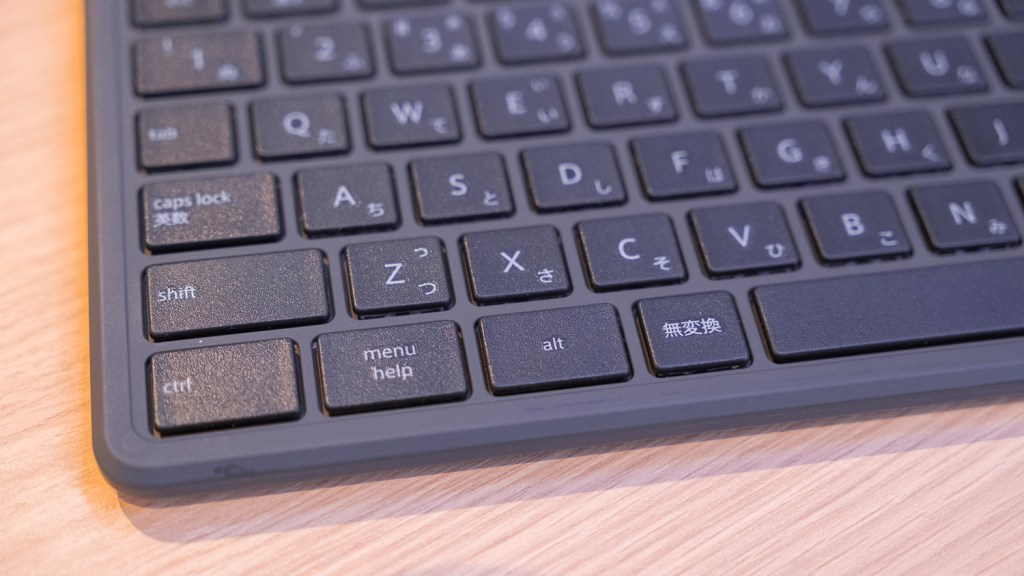
The device offers an SD card slot along with the built-in 1.3GB of storage and USB type C connectivity/charge port (that now has a charging status LED too). The battery is rated for about 24 hours of writing work and cannot be replaced – but can be charged on the go from a USB power bank. Personally, I’m more of a replaceable AA cells supporter for smaller devices like this, but the slim profile does not allow this, sadly. How problematic will it be to replace the battery in a few years? Guess I will see.

Lastly, on the hardware side, we also get WiFi and Bluetooth connectivity for sharing files with iOS and Android devices and also use the Pomera as a wireless keyboard.

Software

The writing environment was refreshed a bit, also with a few things I’m very happy to have. Apart from the glorious return of the full English language interface, the DM250 now supports natively UTF-8 text files, has two new fonts we can choose from, and improved outline mode amongst a lot smaller quality-of-live updates.

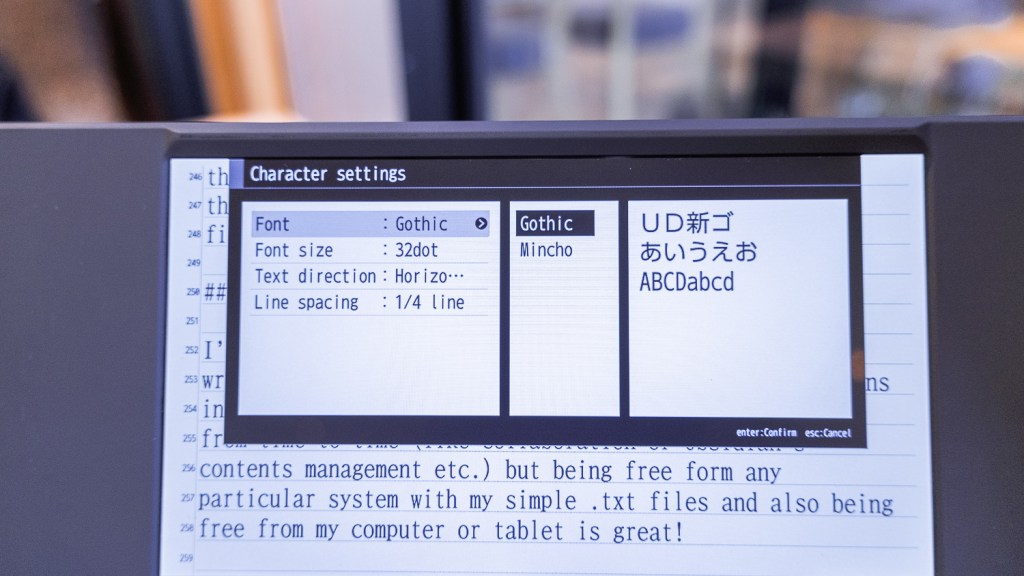
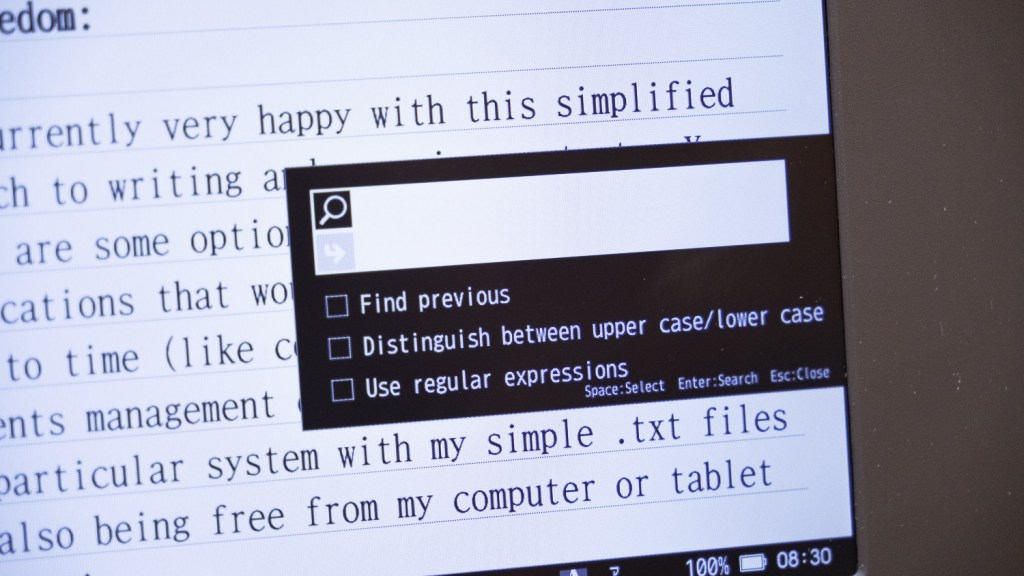
At its heart, it’s still the same, kind of bland maybe, but a very capable and reliable dedicated writing system. We can open, save and edit plain text files while having most of the modern text-editing options at hand: selecting with SHIFT, copy, paste, undo shortcuts (like CTRL+C, CTRL+V, and so on just work as expected!), quick navigation through text with keyboard shortcuts (ALT+arrows and so on), search and replace (with regular expressions!), placing markers and navigating through them, inserting timestamps and special characters.
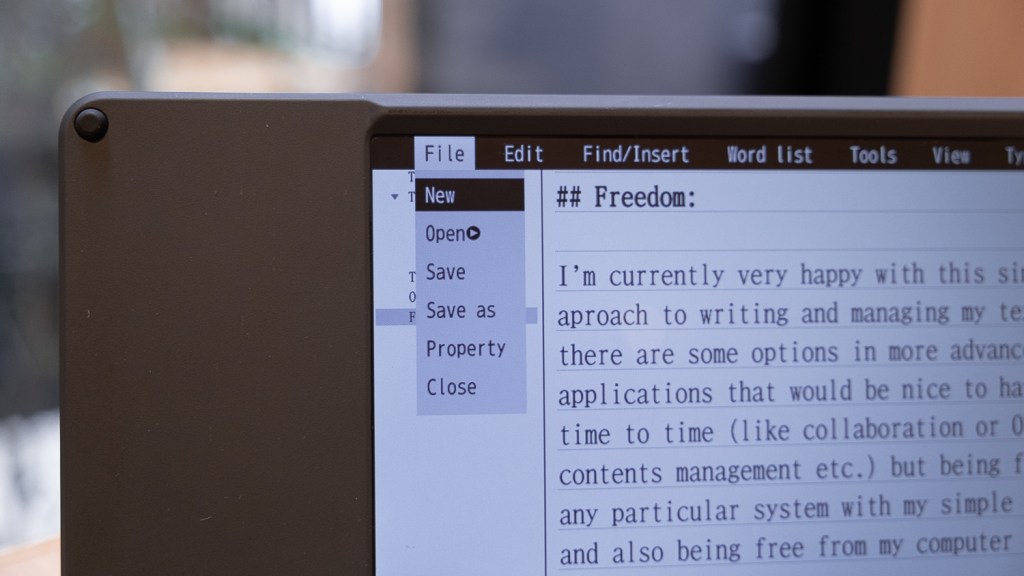
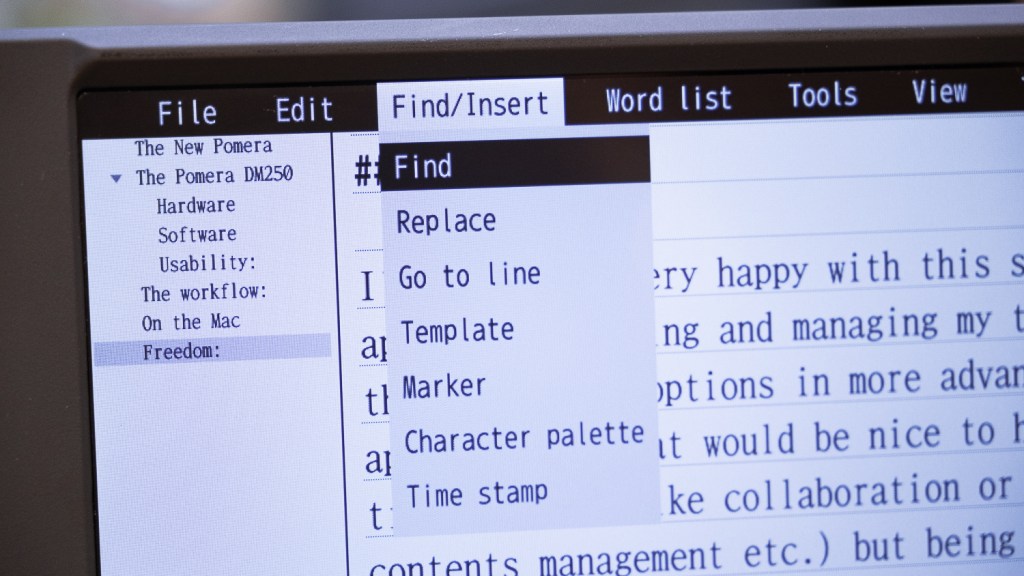
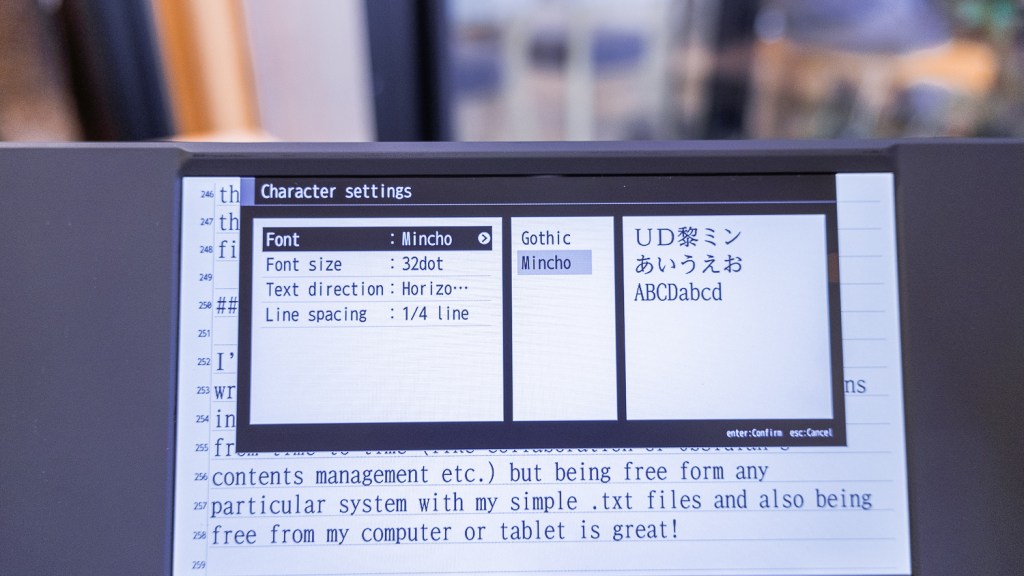
The interface also offers a lot of viewing options like opening two documents side-by-side (or the same document twice), outline and scenario views using the titles we place for navigation, displaying line numbers, inverting the screen colors, working fullscreen, displaying the invisible characters (tabs, spaces, etc.), and controlling the font size, line spacing, page layout, margins and even writing direction.
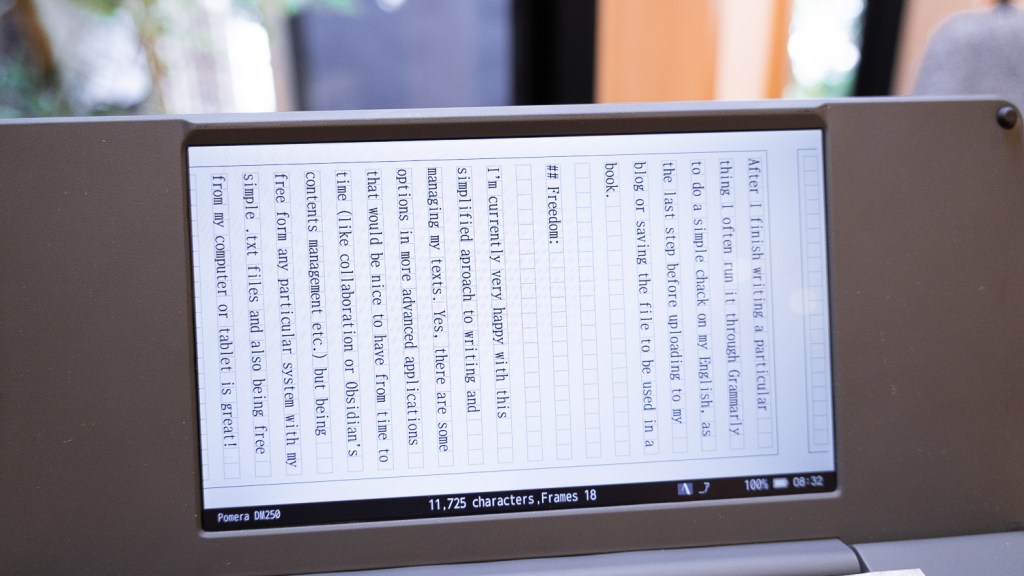
As this is a Japanese device, we can write vertically, from right to left, with a defined page width and length, or even use the Japanese writing sheet layout too (each letter in a small box).


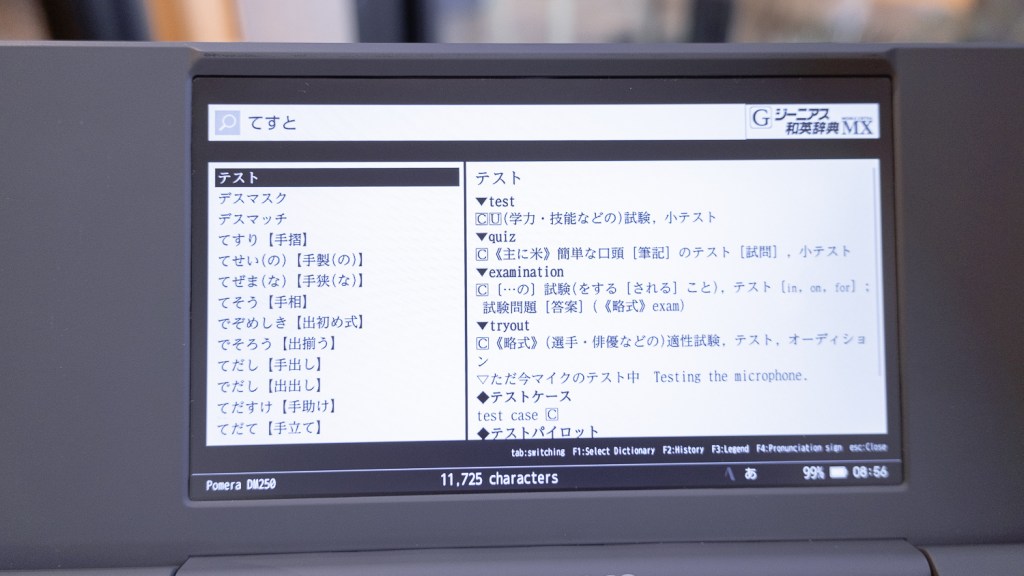
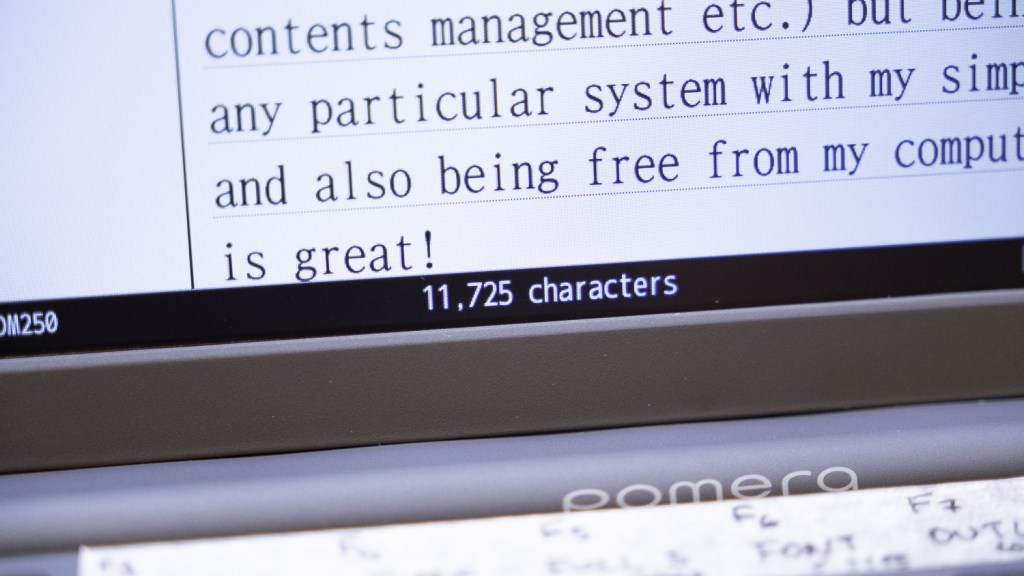
The Pomera also has some bonus functionality like character count, calendar, and dictionaries built in, but that’s it – the DM250 is a dedicated writing device – there are no apps, internet, or anything else to distract us from the task at hand.

One funny quirk of this system is that it allows for writing memos into the specific days of the calendar – so, in theory, the Pomera can be used like a digital journal, but in this mode, it only allows us to save the files to the built-in memory.

The text-sharing functionality allows for a lot of freedom to manage the files: we can save files to the device itself (it has backup and trash folders, too), to the SD card, share, and sync using a dedicated iOS Android app, send text using a QR code displayed on the screen (this way even without the app a smartphone can copy the text), and even send the written file directly via an e-mail (GMAIL or SMTP servers) account like the Freewrite does! Of course, we can also connect the device itself with a USB-C cable to browse the files too.

If that’s not enough, the device can also be used as a wireless keyboard to type directly to a smartphone (I don’t see myself using this functionality as I can just write on the Pomera, but maybe if one suddenly has to chat on Slack while in a cafe or something?).

Anyway, it’s great to be able to manage the files in so many ways and not be locked in any proprietary file and sync system! (I’m pointing at you, Freewrite and ReMarkable!)
Usability:

The thing that surprised me the most about the DM250 was how fast it was – the documents, even big ones from SD card, open, save and scroll in an instant! There’s no lag here whatsoever, even when copying or cutting large portions of text or using menus. This is thanks to the fast hardware (it’s known to be able to run full desktop Linux!) but also to the LCD display that does not lag like the e-ink ones.

The file management interface is a bit confusing but allows for a lot of freedom in saving, loading, copying, and moving files and folders around. It opens .txt file and does not show hidden files that begin from a “.” so I don’t see all the mess Mac system leaves everywhere, with hidden settings and icon files, etc.

I got used to the keyboard quickly and can write as fast as on any laptop with no strain. I configured all the F-row keys to do the menu options I use the most and put a piece of tape as a reminder of what is what – it’s very useful to have all my favorite functions just there on the keyboard.

So far, the DM250 is easily the best dedicated writing device I have used! Even if it’s not the flashiest or most stylish and does everything in a dull, understated, office-like way, it’s just great. The Pomera just gets out of the way, and I can focus on writing.

There are only a few things I would like to change about it though, maybe in the DM300 edition:

The screen is VERY reflective. Enough so that I just had to paste a mat screen protector foil or deal with always seeing everything that was behind me reflected in the screen while I wrote. In my opinion, the mat screen protector is a MUST-BUY with the Pomera DM250, and I would not imagine using the device without it. Just look at the photos below!

I also wish the screen would be a bit brighter with an option to control the warmth of the backlight.

As I said in the intro, I would actually prefer a different technology display, like a fast, memory LCD, backlit screen, but apparently, we are not there yet.
Also, having a backlight keyboard would be a nice thing to have, too, as I can’t touch type.

On the software side, I would like some more fonts to choose from or the ability to upload my own (if possible, with some not-monospaced ones, too!), a proper word count (not just character count that includes spaces), and a better file management screen would be great. If I could go even further – an English dictionary and thesaurus added to the Japanese ones would be a cherry on top!

Overall:

I like the Pomeras, and especially this newest iteration, very much. It feels robust, to the point, solid, and well-rounded. It’s not flawless (screen technology), but it does what it promises to do exceptionally well. And that’s also a thing that I like about the company’s approach – Kingjim does not promise me the ultimate writing tool to double my word count, cure me of writer’s block, or make me an inspired novelist overnight. They just promise a good, distraction-free, and compact dedicated text processor, and I’m pleased to report that, on that front, indeed, they delivered!

The workflow:

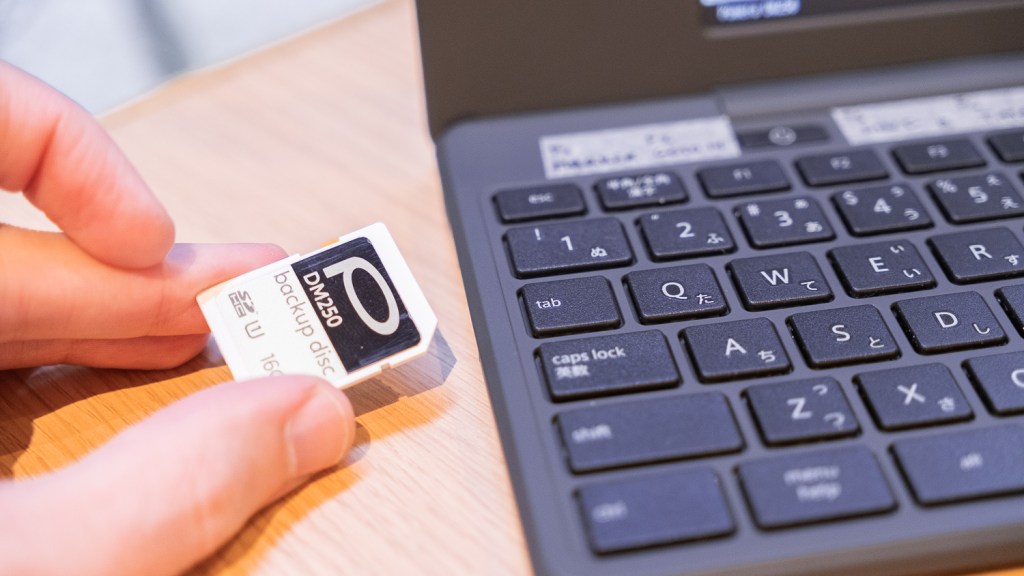
I use a dedicated SD card to store all my memos, articles, text files, and such, as just plain UTF-8 .txt files in folders. The Pomera handles all of this beautifully. When I finish writing or editing something on the device, I save it back to the SD card and also a second time to the in-built memory – this way, I have a backup of all things I wrote on the Pomera, just in case.

On my laptop, I insert the SD card into the side slot and use an app to sync the files to or from a folder on my drive. That’s it! If you don’t mind big corporations reading all your stuff, you could also use a service like Google Drive or Dropbox to backup and sync your SD card each time you pop it into your computer – it works well!

If I want to, I can also open the files on my iPhone or iPad – using an SD card reader dongle – it’s very fast and straightforward.

On the Mac

For years I experimented with many writing applications like Bear, Memos, Scrivener, Atom, or Obsidian, but recently I chose to keep things as simple as I can. I have all my text files in a folder that I use as my memo storage. It has sub-folders for ease of navigation and only .txt files in the UTF-8 encoding. This way, I can open my texts with almost any text editor.

For writing and editing on my Mac and Linux, I currently use Sublime Text with only some Markdown plugins installed. As I use Markdown on the Pomera (it supports titles starting with # marks) and for simple text styles, like bold or italic, I set up Sublime Text so it recognizes .txt files as Markdown and colors the text accordingly. That’s it. There are many plugins for Sublime that aim to make writing prose even more pleasurable, but I rarely use any of them – I do most writing on the Pomera anyway.

Having my texts in this simple form allows for a lot of flexibility – I could use Obsidian if I wanted, or sync the files to my iPad or iPhone with iCloud and use a writing app, like iWritier Pro there too, but I currently don’t feel the need for that.

After I finish writing a particular thing, I often run it through Grammarly to do a simple check on my English as the last step before uploading it to my blog or saving the file to be used in a book.

Freedom:

I’m currently very happy with this simplified approach to writing and managing my texts. Yes, there are some options in more advanced applications that would be nice to have from time to time (like online sharing and collaboration or Obsidian’s contents management etc.), but being free from any particular closed system with my plain .txt files and also being free from my computer or tablet when writing on the Pomera is great!

Whenever I feel playful, I can try to write on a different cool device I’m testing or play around with different apps on my computer, but the Pomera DM250, .txt files on an SD card, and Sublime Text set seem to be a very robust and flexible solution that simply works well and allows me to focus on what I should be doing – writing the next article or few chapters for my book.

Posted in

47 responses to “Retro writing 15 – Pomera DM250”

  1. Marek Avatar
    Marek

    Rzeczywiście aż szkoda, że mieli tyko taki ekran na stanie. Normalnie lusterko!
    Mam nadzieje, że ten model stanie się kultowy i opracują przeróbki zwłaszcza baterię. Ja bym chciał żeby było jak w kindlu, że otwierasz tył i bateria jest na zaczep.

    p.s Mam nadzieję że młodzieży żłobek się spodoba !
    pozdr

    Liked by 1 person

  2. Mateusz Ż Avatar
    Mateusz Ż

    For me it’s a no no because of the screen. DM30 is still superior in that aspect. Big plus is ability to write without a flat surface but it comes with bigger size.

    Liked by 1 person

  3. Marialena Sarris Avatar
    Marialena Sarris

    Radio silence… Where are you? How are you doing? You haven’t post a thing, don’t write anything… is it everything ok?

    Liked by 1 person

    1. Mateusz Urbanowicz Avatar

      Yes I’m OK! Thank you! I’m just very busy painting illustrations for my next book, but I have some new articles in the works too 👍

      Like

  4. Aaron Avatar

    Very useful review and advice, thank you 🙂

    Liked by 1 person

  5. Lanzalingua Avatar

    Thank you so much for this article. This is so far the best review for the DM250 I have found. I even texted King Jim to ask them a few questions as I am considering getting the device for myself, but unfortunately got no response for them. By the way, it is the first time I see someone posting about the possibility of adding special characters such as éóá, etc. (Was that a feature in the previous versions of the Pomera?). My mother tongue is Spanish and it would be the language I would use to write, so… do you think it would be worth to get a Pomera DM250? Do the F-row keys allow for those special characters to be added so they’re typed in a quicker way (instead of direct menu options)? Freewrite Traveler has been my no. 1 option but it is way too expensive and I kind of prefer how the Pomera looks. If you could please clear up my doubts in regards to this magnificent device, I would really appreciate it. Thank you so much in advance. Greetings from the Canary Islands.

    Like

    1. Mateusz Urbanowicz Avatar

      Hi! I’m sorry but I don’t think that comfortable writing in anything that requires special characters (like Polish too, in my case) is possible. Yes, you could choose the letters from special characters menu but 1. they look weird and don’t fit the rest of the font a lot of the times. 2. I don’t think it’s possible to bind them to any of the function keys either.

      Like

  6. Richard Dove Avatar

    Thanks so much for this very thorough and useful review! Can you tell me if it can do a word count? Thanks so much R

    Like

    1. Mateusz Urbanowicz Avatar

      Hi! Thanks! It can do Letter-count, not word count sadly. What I did was I analyzed some of my previous writing to know my medium letter per word ratio to know more or less how many words I have written.

      Like

  7. Kamen Avatar
    Kamen

    Random, but—I found your blog doing research on the Pomera and I just now realized you are also one of my favorite artists. I came back from Japan with a Pomera d250, in large part encouraged by your review, and some of your art books, purchased with zero knowledge they were related.

    Like

    1. Mateusz Urbanowicz Avatar

      hahahah that’s such an awesome coincidence! PS the DM250 is so nice 👍

      Like

  8. Tim Avatar
    Tim

    You’ve written the best Dm250 review I’ve seen. I’m thinking of getting the device as a distraction-free method for writing my next novel, so I appreciate your writer-centric review. Does the US layout mode put the apostrophe/quote key in the correct location? They aren’t printed on the keyboard where I’d expect (i.e. I’m not going to need to use function keys like on their other models?). Thanks so much!

    Like

    1. Mateusz Urbanowicz Avatar

      The Pomera is a Japanese keyboard layout (the same that Apple uses for example) the ” is Shift+2 and ‘ is Shift+7 additionally there is also ` with Shift+@ 👍

      Like

      1. Tim Avatar
        Tim

        Thanks for responding. On a Youtube video of the Pomera DM250 I saw that the device comes with black stickers you can put on the some of the buttons if you want to use the US keyboard mode. For example, you can change the Shift+2 to output the @ symbol, like on an English/US apply keyboard.

        Apparently, there is a setting within the Pomera menu to change to US keyboard layout mode. When selecting English language, it pops up with a “select keyboard layout” and you can choose the US layout (as opposed to JIS layout). A small “US” will show up on the screen at the bottom. Then you have to make sure that the “Romanji” Latin input mode is selected using Alt+~

        I’m wondering if you ever tried this … and if doing so also puts the ” and ‘ into the expected location (two keys to the right of the letter L). I can’t imagine writing a book full of contractions and quotations using Shift-2 and Shift-7 all the time. Hope that makes sense. I’ll understand if you’re too busy to check. -Tim

        Like

      2. Mateusz Urbanowicz Avatar

        Ah I see! I somehow completely ignored this as I’m used to using the JIS keyboard daily on all my devices. Yes I checked and the option is there. Turning it on it makes the ” and ‘ to the keys next to L so ; : and ” ‘ are on the right of L and Shift+2 make @ etc. I don’t know where I put the stickers but yes the option works it also makes the Japanese 無変換 変換 keys into Space.

        Like

  9. Tim Avatar
    Tim

    Thank you so much for checking on all the features. The Pomera looks like a neat distraction-free writing device and a good (better) alternative to the Freewrite traveler (at least for me). I appreciate your help and your excellent review!

    Like

  10. Serena Avatar
    Serena

    Hi, thanks for the review. I would like to get a Pomera, but can it be used with a custom keyboard layout?

    Like

    1. Mateusz Urbanowicz Avatar

      Hi! I’m afraid the DM250 only has Japanese layout and US layout (through stickers you have to put on your keyboard – included though) 👍

      Like

  11. Vince Hase Avatar

    I don’t know if you’ve run accross this, yet – But there is a version 1.1 system update. It is supposed to improve battery life when closed and kill a bug of freezing once in awhile after unplugging from charging. It’s here (get your Google Translate ready): https://www.kingjim.co.jp/download/pomera/dm250/01.html

    I’ve just installed on my 250, so I cannot yet say weather there is improvement. But it did drain if you left it sitting for awhile, and I have had it freeze a couple of times after charging, so here’s hoping! 🙂

    Like

    1. Mateusz Urbanowicz Avatar

      Thanks! I checked it out and I already had it! I think I updated it as soon as I got it 👍

      Like

  12. Ed Sempio Avatar
    Ed Sempio

    Many thanks for the review! Could you tell us what the key pitch of the DM250 is? How many millimeters from the center of one key to the center of the next key?

    Like

    1. Mateusz Urbanowicz Avatar

      Hi! I use the SANWA SUPPLY PDA-FDM200 protector. It works quite nice! And for the key size – it’s about 1.8cm from key center to next key center looking sideways. Hope that helps.

      Like

      1. eduardosempio Avatar
        eduardosempio

        Thank you for the key spacing. That’s really helpful.

        Like

  13. Tiffany Lee Avatar
    Tiffany Lee

    Hi! Which screen protector/matte protector did you purchase and use for your DM250? Thank you!

    Like

    1. Mateusz Urbanowicz Avatar

      Hi! I use the SANWA SUPPLY PDA-FDM200 protector. It works quite nice!

      Like

  14. RC Avatar
    RC

    2 Questions!

    1. Does the “tab” indent the paragraph? (Esp when writing fiction!)
    2. Is there a way to set the margins? (The paragraph width is a bit big for reading)

    Thank you for the informative review!

    Like

    1. Mateusz Urbanowicz Avatar

      Answering your questions:

      1. Tab works as usual, you can use it to indent things – just there is no automatic indentation, sadly. Pressing Tab mover the cursor about 4spaces to right as usual.
      2. Yes, in a way, you can decide the number of characters horizontally and number of lines vertically. This basically makes the writing space narrower if that’s what you are after.

      Best, Matt.

      Like

  15. Federico Avatar
    Federico

    Hello and thank you for this detailed review. Considering buying this item and have some questions (well.. sorry to bother you about this and not Pomera, but you seem to be so nice and responsive! :D)

    1- I understand there’s a fixed backlight, you can’t disable nor dim, is this correct?
    2- Did you notice issues with battery life so far? Had some other portable integrated battery devices (with e-ink screen) and they lasted no more than a couple years sadly – battery replacement was possible, but with many downsides (shipping times and costs, long wating times etc.)
    3- you probably can’t answer this but I will try: do you think it would be possible to replace the builtin battery with external power (such as a power bank). That would make me sleep better 😀

    Aside from these possible issues, it would be perfect for my needs (plain text no frills just edit and move txt files)!

    Thank you so much from Italy

    Like

    1. Mateusz Urbanowicz Avatar

      Hi! No problem:
      1. The backlight is always on (it’s just an LCD) but you can regulate the brightness with menu or keyboard shortcuts.
      2. No, I had it for two years and it’s rock solid so far, both when I use it and when it just sits on my shelf – I can leave it for a month and it still has 90% charge when I open it. So far the battery is very good – I would prefer just replaceable AA cells though of course.
      3. You can use it while it’s connected to a power bank or a 5v charger via USB and it’s like constantly being charged – in theory you could have it plugged in constantly on your desk and than disconnect it only when going out. You can also use it outside with a USB power bank.

      🙂 glad to help, Matt

      Like

  16. Chris Cole Avatar
    Chris Cole

    Great, detailed review. Thanks!

    If this thing ran on AA batteries, it would be the holy grail of portable writing devices.

    It looks like it supports multi-pane editing (2 documents at once) and a left-most pane with a file tree as well.

    Is it capable of displaying all 3 simultaneously? This is how I work in Obsidian (file tree + body of chapter + notes for chapter, side by side).

    Similarly, is the file tree there only when accessing the FILE menu, or can it be there whenever you like?

    Cheers!

    Chris

    Like

    1. Mateusz Urbanowicz Avatar

      Hi Chris!

      Yup having 2 or maybe even three Lithium AAA would be best!

      Multi pane can do 2 files at once (not three, the screen is too small anyway) but it’s more for comparison purposes than anything else – so no 2 files and outline at once, sadly. The outline can be used only in single-file mode.

      The File -> Open screen is the basic and only way of viewing and managing the files. Other than that you get the 10 last opened files as a list if you “open” the Open menu instead of using ENTER on it. So it’s relatively quick to open recent files but you have to save them etc. It’s not a real multi-file editor. I wish there were tabs or at least a few “buffers” under shortcut keys but that’s not here.

      Matt

      Like

      1. Chris Cole Avatar
        Chris Cole

        Hiya,

        Thanks for the response and info.

        The 2-files-side-by-side capability is enough to sell it for me (chapter I’m working on in 1 pane, and my notes/plan for that chapter in the the 2nd pane).

        In an ideal universe, I’d have a file tree in the left-most (3rd) pane as well (as in Obsidian), but that’s not a deal-breaker, especially with the file & other menus there at the touch of a button.

        I suspect I will end up using the Outline feature, but probably for other simple note-taking / drafting / outlining for not-fiction-writing tasks (eg laying out teaching presentations, notes on a topic, etc.) where 1 main file open is just fine.

        Ended up buying it from Amazon, because it was $495 AUD including a case/sleeve, and shipping, vs $855 AUD from say Good E-Reader, without a case/sleeve. It is (allegedly and hopefully) presently wending its way from Japan to Australia.

        Very much looking forward to fiddling with and hopefully routinely using it. 🙂

        Cheers,
        Chris

        Like

      2. Mateusz Urbanowicz Avatar

        Happy fiddling! 👍 It’s a very solid-feeling device (even if weird a bit because of it’s Japanese roots) so I think you will have a good time. I recommend the mat screen protector very much SANWA supply PDA-FDM200 😉

        Like

  17. Chris Cole Avatar
    Chris Cole

    Thanks!

    I ordered a different anti-reflection screen film/protector, but have now added the one you suggested… will see which seems better in person. 🙂

    Like

  18. mugen Avatar

    I’ve been considering getting one of these for a while and am really sensitive to LCD Screens. The D30 eink option felt best but, wasn’t sure if the D30 had a USB port, which would be very convenient. Also looking for something more cost effective.

    Would love to hear any feedback or personal experience you’ve had between the D30 and D250. Thank you!

    Like

    1. Mateusz Urbanowicz Avatar

      Hi!

      Thank you for your comment!

      For me the main difference between the DM250 and DM30 is that the DM250 feels like a small laptop and the DM30 like a “gadget”. The DM250 feels more reliable and good to be used everywhere no only for writing but also for editing (because it has fast screen). The DM30 feels more like a typewriter to be used to write but not edit so much because of the lag and feels more flimsy because of the fordable form factor.

      This being said of course the e-ink is great to look at especially outdoors! But if I was to do really serious typing on the go and e-ink was a MUST-HAVE I would probably go for something like Boox or Remarkable because there is no foldable keyboard that could break. I could also use Bluetooth keyboards presumably.

      The DM250 also has some software updates (like UTF8 files) that help a lot.

      Like

  19. Martin Avatar

    Nice article, and website. How would you rate it compared to the Psion 5MX?

    Like

    1. Mateusz Urbanowicz Avatar

      Well it’s a modern device with a modern screen and USB-C and stuff so it’s very very easy to use and “safe” in this way the old Psions the end to be more of a hobby project (old and crumbling) one has to care about than an everyday use device.

      Like

      1. Martin Avatar

        Thanks! I have the DM250 and love it for when I just want to write. I would kind of love the screen to be e-ink, but there we go. I know you compared it to the DM30, and though that device is also extremely cool, perhaps it’s a bit too fragile overall…

        I’ve bought a Psion 5MX that arrives next week—purely because of nostalgia. I remember them being released when i was in my teens, and I wanted nothing more. 10 years later, I wanted the Sony Vaio P, which I might also pick up.

        I am somehow bored and frustrated with the design of things today, such as the iPad on which I write this message. With the keyboard attached (though it’s a good keyboard) it’s over 1KG in weight.

        I prefer my 12” MacBook retina that somehow manages to limp along today, even though that device itself approaches 10 years old.

        Keep writing, and thanks.

        Like

      2. leonidas0209 Avatar
        leonidas0209

        I don’t suppose you could share the dictionary files. For some reason my dictionaries are empty…!

        Like

      3. Mateusz Urbanowicz Avatar

        I don’t think this can be done – as far as I know the dictionaries are “baked in” into the firmware? Weird!

        Like

  20. Mahak Avatar
    Mahak

    Hello there. Thank you for such a thorough description! I am planning to purchase a Pomero dm250 from Amazon Japan (after converting the currency, it is costing me around $390. Luckily it says that it can deliver to Singapore! I will mainly be using it for writing poetries, short stories and journalling. As much as I enjoy working on my MacBook, I realised it is distracting and limits my creative thinking. The other products like freewrite traveller is quite expensive. I have also come to realise that in the mornings, I find myself using devices rather than a physical diary. Hence, I feel that Pomero dm250 will be of good use to me!

    Like

  21. Marek Avatar
    Marek

    Witam!

    Nie wiem czy Pan to już widział : https://m.youtube.com/watch?v=-P8MK0iT04k&pp=ugUEEgJlbg%3D%3D

    Kolejna mikromaszyna do pisania. Dla mnie fajna, ale jak “niewierny Tomasz” musiałbym pomacać żeby mieć pewność. Prawdopodobnie wgrałbym też inny soft, bo używanie Rpi tylko do pisania to bluźnierstwo. Znowu wraca też pytanie czy nie będzie łatwiej i taniej kupić używany tablet lub laptop..

    Pozdrawiam

    Like

    1. Mateusz Urbanowicz Avatar

      Witam!

      A tak! Widziałem różne wersje tej maszyny na Reddicie – to wygląda super acz trochę bardziej DIY niż to co zwykle bym chciał używać do pracy – no ale lepsze może niż ten duży Freewrite 😉 Osobiście używam Pomerę DM250 a że teraz wyszła też wersja US więc jest bardziej dostępna dla kogoś nie-Japońskiego też 👍 No ale pełen Linux na takim gadżecie jest fajny – przyznaję!

      Like

    2. pinang89 Avatar
      pinang89

      Ten facet w ogóle ma super urządzonka w swoim sklepie. Rev.7 bym brał od razu. Dodatkowy plus że można sobie samemu złożyć. Ale… za takie pieniądze? to raczej zabawa dla bardziej zamożnych. a jak ktoś chce już złożone to gościu chce jeszcze żeby mu zapłacić za pracę… Ogólnie ja byłbym na tak gdyby nie cena. Sam używam Pomery DM30. Ma dużą zaletę że jest malutka więc można ją wszędzie zabrać (oczywiscie sila rzeczy minusem jest klawiatura malutka). Kupiłem nowiutką za niecałe 500zł na allegro. Rev7 która też ma e-ink będzie pewnie najbliższa mojej Pomerze a kosztuje dwa razy tyle PLUS jego praca żeby to złożyć (porownujac gotowy produkt) PLUS wysyłka 20 USD. W skrócie fajne i podziwiam gościa za te konstrukcje ale dla zwykłego kowalskiego to po prostu fanaberia, na którą nie wyrzuci takiej kwoty. Tym bardziej że pdobne urządzenie uznanej marki jest znacznie tańsze.

      Jako super budźetowe rozwiązanie dla chcących pisać bez dystrakcji polecam aplikację Cold Turkey gdzie ustawiasz czas lub liczbę wymaganych słów i póki tego nie zrobisz masz zablokowany cały komputer.

      Like

Leave a reply to Tim Cancel reply

This site uses Akismet to reduce spam. Learn how your comment data is processed.