One of the problems of coloring a piece traditionally, and especially so with watercolors is making mistakes. If we make a big mistake when coloring a line art, not only we lose the time we spent putting the colors in but also the original line art done with ink or pencils.

To be less stressed while coloring and to allow myself bolder use of colors I often scan the line art and test the colors digitally to be sure that the coloring scheme I have in mind will really work. Also, having a high-resolution scan of the lines comes in handy (especially with pencil lines) because it can be used on the finished piece to make the lines appear darker using Photoshop’s “multiply” layer.

Recently Kana started doing watercolor illustrations, and she wanted to test her colors directly on the watercolor paper – using a printout copy of the lines. And since we have a printer (Canon PRO-10s) that prints using pigment inks we wanted to test if printed lines can be used for the final coloring work.

The print went well: nice and sharp on our usual watercolor paper (300g Waterford white cold pressed), but when we started painting, strange things started to happen. Waterford is a good paper, I used it for many illustrations but we had problems to make our washes look like they supposed to.
image

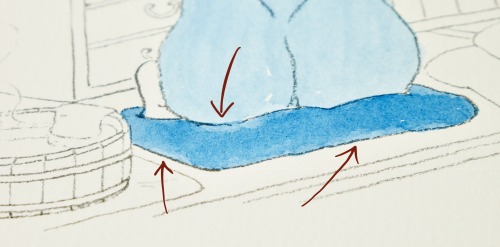
Even simple washes that were done without any hesitation, pausing or correcting did not come out as expected. Mostly in the area of lines the paint wouldn’t just dry properly and evenly.

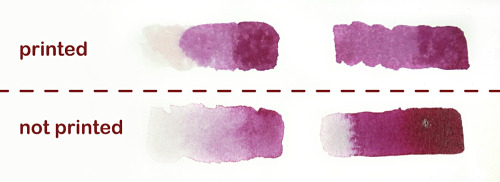
I did some testing and discovered that the printer’s ink (or clear coating that the printer apparently also applies) does not play well with watercolors. The watercolor’s pigment seems to be repelled by the lines resulting in very uneven washes.

image

Even in places where there is nothing printed the paint behaves weirdly (?) so I guess that the whole printing area could be covered in some sort of coating.

The paint behaves in completely different way than usual, the moisture being “sucked into” the paper really rapidly behaving more similarly to alcohol markers.
I tried to do some simple color gradients from full color intensity to transparent and failed on the printed paper. What’s more the washes had strange blurriness and blotchiness to them.
image

Overall – the fact that we can print lines on regular watercolor paper is a step in an interesting direction. The printed lines are certainly waterproof and sharp enough to be useful, but the watercolor repelling properties make them only a test ground for colors. For now, for the final pieces, the original pencil or pen lines have to be used.

Posted in

4 responses to “Printing lines for watercolors”

  1. Marialena Sarris Avatar

    The binder of the printers’ inks is made of petroleum derivatives that interact badly with the gelatine sizing of the Waterford paper.
    That is the reason why the areas arround the printed lines repelled the watercolours.
    By the time that the concept is to test the colour combinations before making the final piece, you don’t actually need the lines printed on the test paper. You just need to have them somewhere else separately. Just the lines.
    A very old trick is to copy the lines on trasnparent acrylic film – those that are used for presenting artworks work nicely with Rotring ink and might can be printed too. ( I haven’t test that ). Make the line art on the acrylic, put it under the watercolour paper sheet of your choise, on a light box and test the watercolours this way. There is no reason to copy the lines on the test paper.
    You can scan or photograph the acrylic sheet with the line art and you can put it over different test papers in order to see how the different coloured test paintings will look like along with the lines.

    Liked by 1 person

  2. Dave Astels Avatar
    Dave Astels

    I’ve started doing this as well: sketch (in an MD Cotton sketchbook… what a joy that paper is), scan, print (set to greyscale), paint. I have a Canon iP8720 printer and the ink doesn’t interact with watercolour the way you describe.

    Like

  3. Anna Avatar
    Anna

    Thanks a lot for sharing the insight! I was thinking about doing some layout printing on watercolor paper with a printer for a while, but I pushed back on the idea as I suspected that something would go horribly wrong. With high-quality watercolor paper being quite pricey, destroying a couple of sheets with a printer just wasn’t tempting.

    By the way, I did have cases where high-quality watercolor paper like Winsor & Newton 300 gsm had odd areas where paint wasn’t layering well, and it felt like some water-resistant coating affected a small area of the sheet. Must be a factory issue. So such surprises can happen even when no printer is being used. Not saying that it is a bad watercolor just that an odd sheet can be faulty.

    For now, I stick to drawing with pencil and then filling in with watercolor paints. Also, when I smudge or make another mistake with watercolors (a hobbyist, so I make those often), I correct them with a magic sponge (melamine foam). When you draw on strong watercolor paper like 300 gsm and use professional watercolor paints or something close enough, this sponge lifts paint well without damaging the paper. Though some fluorescent paints can be stubborn.

    Have you found any amazing Japanese watercolors? Japan is like a stationery haven.

    Anna

    Like

    1. Mateusz Urbanowicz Avatar

      I think that the Winsor & Newton odd areas where paint wasn’t layering well might be just watercolor paper sizing going bad – Waterford paper has that a lot especially starting from the edges – the easy way to test is to use pure water on the paper – put a drop on – and see if it stays on the surface (good) or just gets sucked right in (bad).

      Thanks for the melamine foam tip – I try to use as little plastic stuff as I can though!

      Hmm, I have been using a lot of Holbein and Kusakabe Harmonia paints – these are good but like 10 times cheaper than Schmincke in Japan – but I’m trying to keep things simple, not to buy too much I will not use in the end hahaha! Have a look here, I updated my tools list recently: https://mateuszurbanowicz.com/tools-wip/

      Like

Leave a reply to Mateusz Urbanowicz Cancel reply

This site uses Akismet to reduce spam. Learn how your comment data is processed.